
Shared Family Calendar App


Keep your family’s plans on track with Family Daily’s simple but powerful Shared Family Calendar 🗓
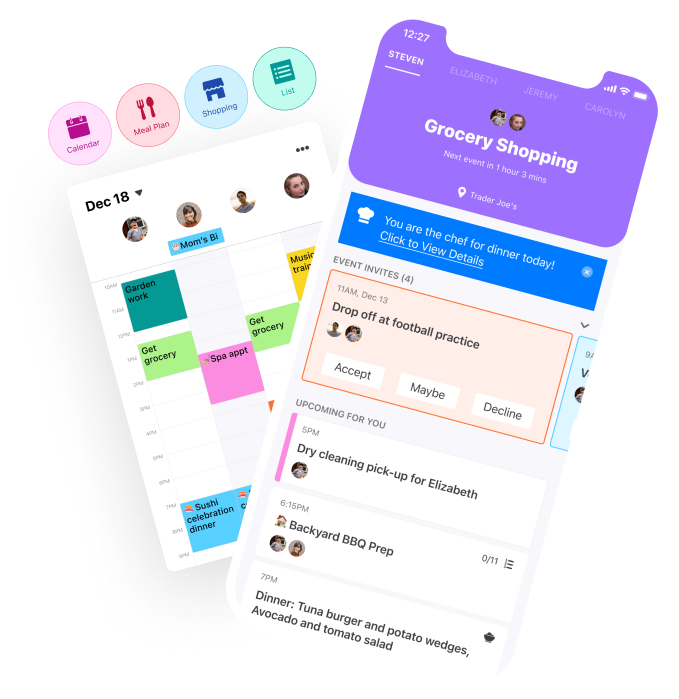
View Your Entire Family’s Calendars from One Central App
🏌️♂️ Dad’s Weekend Tee Time?
💼 Mom’s Business Meetings?
⚽️ Kids Soccer Practice?
🏕 A Family Trip At The Weekend?
With Family Daily, you can view your whole family’s schedule in one app, and they can view yours.
Seamlessly Sync Everyone’s Calendar: Work, Home, and School


Google Calendar Integration ⚡️
Apple Calendar Integration 💪
Customize Your Calendar
Choose Your View 🗂
View your individual or family calendar in one-day, three-day, weekly, or monthly views 📅
Weekly Preview Email 📨
Every Sunday evening, we’ll send you a preview of your week so you’re ready to go 💪
Organize Family Events 🏡
Create events right from Family Daily and invite your whole family. Set reminders, make events recurring, and more 👨👩👧👦
Explore More Family Daily Features
-

Shared Grocery Lists
Everyone can add their favorite items to the shared shopping list and the list gets synced in real time for all family members. Whoever does the shopping can save time on shopping and get all items in one trip. You can also organize your list by categories and add new items. Whatever your taste, we’ve got you covered.
-

Meal Planning Made Easy
We know getting meals planned is important! You can plan all meals for the week or just a few days of the week. The intuitive user interface makes it easy to include any details, e.g., cook time, meal time, chef, ingredients, instructions. You can also generate a grocery list from recipes and meals.
-

Built-In Recipe Library
Family Daily comes with thousands of built-in recipes, from comfort foods to fancy date night dishes. Search recipes by cook time, type of cuisine, and even specific requirements, such as “gluten free muffins without nuts.” Additionally, you can create and store your own recipes for everyone in the family to access.
-

Powerful To-Do Lists
One family, shared responsibility. Distribute housework among family members through shared to-do lists. For each chore or to-do item, add a due date and track progress. The flexible list feature also allows you to create personal to-dos that can be viewed by you only.
-

Family Location
See where everyone is on one family map. Save the places that matter, like home, school or practice, and get notified when someone arrives or leaves. Each family member chooses who can see their location.
-

Family Photos
Gather the family's photos in shared albums, so no one has to send pictures one by one. Everyone is notified when new photos arrive, and an album can stay private when you'd rather keep it to yourself.
-

Family Documents
Keep the family's important documents where everyone can find them: school forms, insurance cards, passports, receipts. Sort them into folders, open them on any device, and keep a folder private when it's for your eyes only.
-

Family Sports
Follow every team in the family: games, scores and the season's wins, draws and losses. Add training sessions that repeat every week. Everything shows up in the family calendar, with reminders so no one misses kick-off.
-
Family Allowance & Rewards
Pay your kids a regular allowance and turn chores into rewards. Each completed chore earns money, points or screen time, and a parent approves it in one tap. Kids watch their balance grow, and you see who did what.
-

Family Daily on the Web
Family Daily also works in your web browser. Check the calendar, update lists or plan meals from your computer, and everything stays in sync with the family's phones.
Download Family Daily Now
Family Daily is the only app you need to keep your family life on track. Use it to:
Coordinate calendars, schedule events, and plan activities
Create shared to-do lists for family chores
Import and export calendars from Google, Apple, and more
View and edit shared shopping lists
Plan meals with over 360,000 pre-loaded recipes
Store and view family recipes
See where your family is on one map
Share photos and documents, privately if you like
Follow your kids' teams, games and practices
Reward chores with money, points or screen time
And much, much more…